This post leans on achieving the objective of providing developers access to a newly created VM and IAM role for a certain amount of time and then tearing them down in a locked environment.
The process involves following steps to achieve the stated goal:
- Developer breaks glass by creating a pull request on GitHub and then getting it merged to main/master branch.
- This will then trigger a GH Action to provision a VM on GCP.
- A custom role will be created for the developer with appropriate permissions.
- Add that custom role to an IAM policy binding including the developer’s user email.
- Remove the IAM policy binding, delete the custom role, and delete VM after a pre-defined timeframe.
There were several concerns with the sequence of this workflow in terms of passing variables from GitHub actions and selection of suitable GCP resources for a serverless approach. The design involving multiple GCP resources; Cloud Functions for provisioning and deleting each resource, Pub/Sub to pass parameters and trigger functions, and a Cloud Scheduler to schedule the triggers, is a bit tedious work with a lot of moving parts.
The above solution fulfills the objectives but raises concerns over multiple services in action, where breaking of one service during the break glass process will result in failure of the overall workflow. A different approach can be utilized using Cloud Workflows while achieving the same results.
Cloud Workflows
Cloud Workflows was used instead to create serverless workflow that linked series of steps together in an order defined. Users can manage workflows from the Google Cloud Console, from the command line using the Cloud SDK, or using the REST API. Key features of Cloud Workflows include:
- Reliable Workflow execution
- Built-in error handling
- Passing variable values between steps
- Cloud Logging
Cloud Workflows defines a series of step definitions in a sequential manner, but with integrating the jump instructions and conditions, it is easy to get lost between the order of steps. Fortunately, the ability to visualize the Cloud Workflow definition while editing in real time has been introduced in GCP. Currently, Cloud Workflows is only available in us-central1, asia-southeast1, and Europe-west4.
Solution
The solution was created by utilizing Cloud Workflows and Cloud Build containers. Provisioning of resources such as VM and IAM roles was handled by calling API’s defined in Workflow steps. Cloud Build containers were used to add and remove IAM policy bindings using a gcloud command instead of using a Cloud Function or by calling an API.
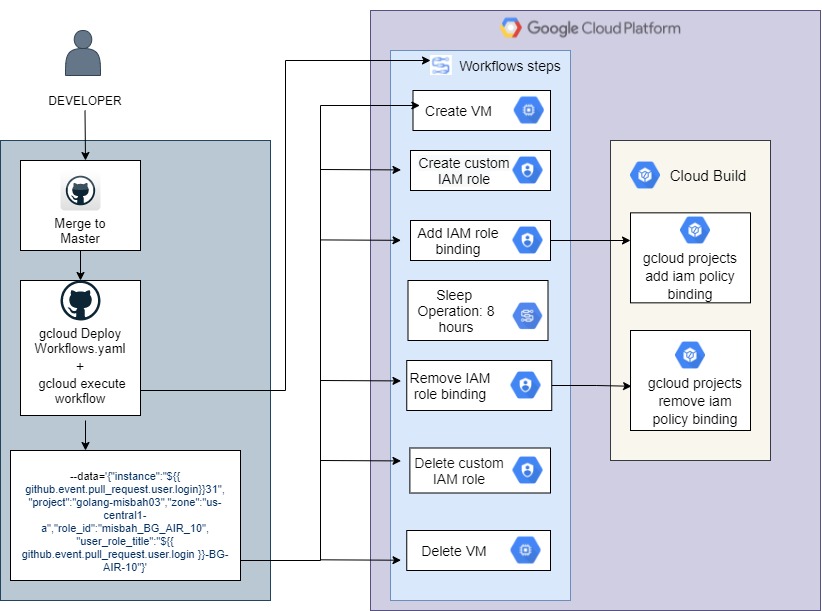
GitHub Actions
A control git repository was created which was then utilized as an entry point for the break glass initialization process. A GitHub Actions workflows was created with assistance from which would get triggered on pull request being merged to main/master branch.
name: 'Workflows'

on:
  pull_request:
    types: [closed]

jobs:
  setup-build-publish-deploy:
    name: Setup, Build, Publish, and Deploy
    runs-on: ubuntu-latest

    defaults:
      run:
        shell: bash

    steps:
    - name: Checkout
      uses: actions/checkout@v2

    - name: Set up gcloud Cloud SDK environment
      env:
       PROJECT_ID: ${{ secrets.PROJECT_ID }}
       GOOGLE_CREDENTIALS: ${{ secrets.GOOGLE_CREDENTIALS }}

      uses: google-github-actions/setup-gcloud@v0.2.0
      with:
          service_account_key: ${{ secrets.GOOGLE_APPLICATION_CREDENTIALS }}
          project_id: ${{ secrets.PROJECT_ID }}
          export_default_credentials: true

    - run: |-
        gcloud components install beta
        gcloud beta workflows deploy ${{ github.event.pull_request.user.login }}-BG \
        --location us-central1 --source .github/workflows/cloud-wf.yaml --quiet
        gcloud workflows execute ${{ github.event.pull_request.user.login }}-BG \
        --data='{"machinetype":"e2-small",\
        "instance":"${{ github.event.pull_request.user.login }}-instance",\
        "project":"workflow-demo","zone":"us-central1-a","user_role_title": \
        "${{ github.event.pull_request.user.login}}_BG_role", \
        "role_id": "bg_role","serviceaccount": \
        "serviceAccount:misbah-sa-01@golang-misbah03.iam.gserviceaccount.com"}'
Once the gcloud SDK environment is setup, cloud workflows yaml file (cloud-wf.yaml) with all the steps declared in it resides in another repository gets deployed. It is then executed using gcloud workflows execute command. The variables can be sent using the –data flag while executing the cloud workflow and then later utilized as global parameters in Workflows .yaml file.
Workflow Steps
A workflow is made up of a series of steps declared using the Workflows syntax, which can be written in either the YAML or JSON format. The workflows yaml file deployed and executed in the GitHub actions has multiple steps which were created using GCP workflow connectors to provision resources. Workflow connectors are pre-defined snippets that provision and connect with GCP resources.
Workflow Connectors: https://github.com/GoogleCloudPlatform/workflows-samples/tree/main/src/connectors
Global Parameters
We assigned global parameters in our main workflow under init. These parameters can be passed in each workflow step as needed.
main:
    params: [args]

    steps:
    - init:
        assign:
        - project: ${args.project}
        - zone: ${args.zone}
        - machineType: ${args.machinetype}
        - instanceName: ${args.instance}
        - serviceAccount: ${args.serviceaccount}
        - role_id: ${args.role_id}
        - role_title: ${args.user_role_title}
The variables passed while executing the workflow using the –data flag can be retrieved using args.[variable_key].
VM creation
The next step revolves around VM provisioning using the workflow connector which calls the API v1.instances.insert.
    - create_machine:
        call: googleapis.compute.v1.instances.insert
        args:
          project: ${project}
          zone: ${zone}
          body:
            name: ${instanceName}
            machineType: ${"zones/" + zone + "/machineTypes/" + machineType}
            disks:
            - initializeParams:
                sourceImage: "projects/debian-cloud/global/images/\
                debian-10-buster-v20201112"
              boot: true
              autoDelete: true
            networkInterfaces:
            - network: "global/networks/default"
Note that the additional configurations can be declared in the body of create_machine such as a startup-script and disk size. This can be simplified further by inserting the REST Equivalent of a VM creation through console in the body of this step. It is important to note here that compute.disks.create and compute.instances.create permissions are attached to the service account tied to this Workflow.
    - RoleCreate:
            call: http.post
            args:
              url: '${"https://iam.googleapis.com/v1/projects/ \
                    "+project+"/roles"}'
              auth:
                type: OAuth2
              body: {
                "roleId": "${role_id}",
                "role": {
                    "title": "${role_title}",
                    "description": "cloud sql full access but no delete db",
                    "stage": "GA",
                    "includedPermissions": "cloudsql.backupRuns.create"
                }
              }
            result: result
This approach over simplified things which consumes the variables from global parameters. In order to create a role, the service account tied up with this Workflow must include the iam.roles.create permissions. Note that the stage for this custom role should be set as GA (Generally Available).
Add IAM Role Binding
Adding the newly created role to a policy binding requires the use of gcloud commands executed on Cloud Build containers. Alternatively, this can also be done using Cloud Functions or by calling an API (not recommended).
Cloud Workflow to launch a Cloud Build operation
Cloud Build can be triggered by REST API. Creating an IAM role binding step was planned to be executed by running a gcloud command on a gcr.io/google.com/cloudsdktool/cloud-sdk container with gcloud utility built-in.
TIP: Once the Cloud Build API is enabled, a special service account is created which is linked with Cloud Build ([PROJECT_NUMBER]@cloudbuild.gserviceaccount.com).
The Cloud Build service account needs following permissions to fulfill the stated objective.
resourcemanager.projects.getIamPolicy
resourcemanager.projects.setIamPolicy
cloudbuild.builds.create
cloudbuild.builds.get
cloudbuild.builds.list
cloudbuild.builds.update
CloudBuildCreate:
  params: [project, build]
  steps:
    - buildCreate:
        try:
          call: http.post
          args:
            url: ${"https://cloudbuild.googleapis.com/v1/\
                 projects/"+project+"/builds"}
            auth:
              type: OAuth2
            body: ${build}
          result: result
        except:
          as: e
          steps:
            - UnhandledException:
                raise: ${e}
        next: documentFound
    - documentFound:
        return: ${result.body}
The buildCreate_add_role step calls another sub-workflow CloudBuildCreate which sends the project and build parameters to the Cloud Build API.
    - buildCreate_add_role:
        call: CloudBuildCreate
        args:
          project: ${sys.get_env("GOOGLE_CLOUD_PROJECT_ID")}
          build:
            steps:
                - name: "gcr.io/google.com/cloudsdktool/cloud-sdk"
                  args:
                    - "-c"
                    - "gcloud projects add-iam-policy-binding ${_PROJECT_NAME} --member=${_SERVICE_ACCOUNT} --role=projects/${_PROJECT_NAME}/roles/${_ROLE_ID}"
                  entrypoint: "/bin/sh"
            substitutions:
               _PROJECT_NAME: ${project}
               _ROLE_ID: ${role_id}
               _SERVICE_ACCOUNT: ${serviceAccount}

        result: build

    - waitBuildAddRole:
        call: CloudBuildWaitOperation
        args:
          operation: ${build.name}
        result: build
The build step is declared in the invoker step which includes the gcloud command under args. The container instance entry point is defined as /bin/sh. The use of try/except block in CloudBuildCreate is to surface the results that may lead to build failure. Since global parameters can’t be called in the container, use of substitution of variable values will be used.
TIP: Using user-defined substitutions must begin with an underscore ( _ ), and use only uppercase-letters and numbers. This avoids conflicts with built-in substitutions.
CloudBuildWaitOperation:
  params: [operation]
  steps:
    - init:
        assign:
          - i: 0
          - result:
              a: b
    - check_condition:
        switch:
          - condition: ${not("done" in result) AND i<100}
            next: iterate
        next: exit_loop
    - iterate:
        steps:
          - sleep:
              call: sys.sleep
              args:
                seconds: 10
          - process_item:
              call: http.get
              args:
                url: ${"https://cloudbuild.googleapis.com/v1/"+operation}
                auth:
                  type: OAuth2
              result: result
          - assign_loop:
              assign:
                - i: ${i+1}
                - result: ${result.body}
        next: check_condition
    - exit_loop:
        return: ${result}
The CloudBuildWaitOperation sub-workflow checks for the operation every 10 seconds to check if the done flag has been set. There is a limit set of 100 iterations to avoid unhandled failures. This wait step is vital to the workflow sequence, as when it is finished, only then it proceeds to the next step.
Sleep
Workflows suspends executions for a maximum of 31536000 seconds or 1 year through a sys.sleep function. We utilized this feature to suspend the Workflows operation for 8 hours, after which tearing down of resources is initiated.
    - someSleep:
        call: sys.sleep
        args:
          seconds: 28800
Remove IAM Role Binding
The process of removing the IAM role binding is similar to adding an IAM role binding. This step calls CloudBuildCreate to spin up a container and then remove the IAM role binding by executing a gcloud command. Note that once the role has no users or service accounts associated, it is automatically removed from the policy binding.
TIP: Limitations on custom roles and bindings on organizational or project level should be considered beforehand.
    - buildCreate_remove_role:
        call: CloudBuildCreate
        args:
          project: ${sys.get_env("GOOGLE_CLOUD_PROJECT_ID")}
          build:
            steps:
                - name: "gcr.io/google.com/cloudsdktool/cloud-sdk"
                  args:
                    - "-c"
                    - "gcloud projects remove-iam-policy-binding ${_PROJECT_NAME} --member=${_SERVICE_ACCOUNT} --role=projects/${_PROJECT_NAME}/roles/${_ROLE_ID}"
                  entrypoint: "/bin/sh"
            substitutions:
               _PROJECT_NAME: ${project}
               _ROLE_ID: ${role_id}
               _SERVICE_ACCOUNT: ${serviceAccount}

        result: build

    - waitBuildRemoveRole:
        call: CloudBuildWaitOperation
        args:
          operation: ${build.name}
        result: build
Custom Role Deletion
The tearing down process also includes the custom role deletion. This was achieved by simply using the roles.delete HTTP method.
    - RoleDelete:
            call: http.delete
            args:
              url: ${"https://iam.googleapis.com/v1/projects/\
                   "+project+"/roles/"+role_id}
              auth:
                type: OAuth2
Deleting VM
Tearing down the instance as a final step of GCP Cloud Workflows was achieved by simply calling the instances.delete HTTP method.
    - delete_VM:
        call: googleapis.compute.v1.instances.delete
        args:
          project: ${project}
          instance: ${instanceName}
          zone: ${zone}
        result: delete_VM_result
    - last:
        return: ${delete_VM_result}
Conclusion
The implementation described in this blog can be improved in various ways depending on the use case. This solution leans on one service account that provisions and tears down the resources which is not favorable in most scenarios. Instead, provisioning of resources can be moved to GitHub Actions. I hope this blog shed some light on the lesser known but interesting service Cloud Workflows by GCP and how it can be utilized in combination with other GCP services.

 MIR K. MISBAHUDDIN
Leave a comment