
In today’s data-driven world, businesses are generating and collecting vast amounts of information at an unprecedented pace. To extract actionable insights from this data, organizations require powerful analytics tools and scalable infrastructure. Azure Synapse, Microsoft’s integrated analytics service, emerges as a game-changer, enabling businesses to harness the full potential of big data and analytics. Azure Synapse provides a unified platform that seamlessly integrates data engineering, data warehousing, and big data analytics capabilities. It brings together various components such as Apache Spark, Azure Data Lake Storage, and Azure SQL Data Warehouse, enabling users to work with structured and unstructured data efficiently. This integration eliminates data silos and simplifies the process of data exploration, preparation, and analysis.

I recently had the opportunity to work on an existing Azure Synapse workspace from a Site Reliability Engineering (SRE) perspective. The architecture of Azure Synapse mainly comprises four components:
- Synapse SQL (Dedicated SQL pool and Serverless SQL pool)
- Apache Spark
- Azure Data Lake Storage Gen2
- Synapse Analytics Studio
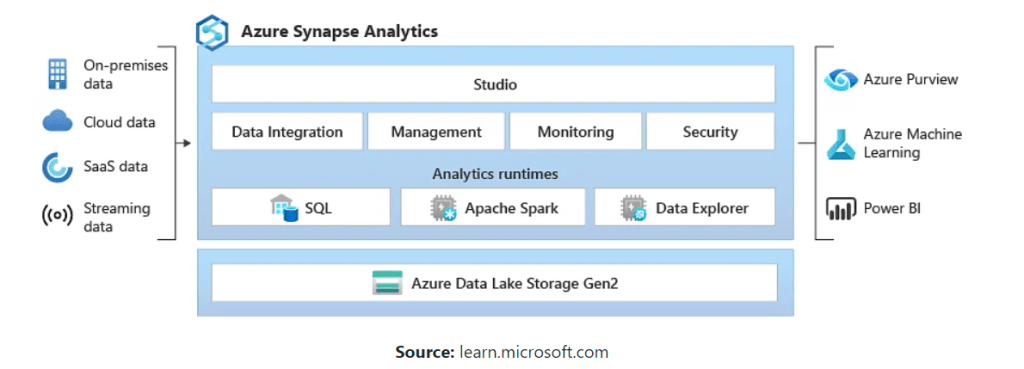
An important aspect of Site Reliability Engineering involves monitoring. Without monitoring, many Site Reliability Engineering practices don’t make sense. The in-scope component of Azure Synapse is ‘Dedicated SQL Pool’ where monitoring of dedicated SQL pool is required.
What I want…
I was trying to find a way to monitor SQL dedicated pool backups in Azure log analytics workspace. The snapshots happen every 8 hours and is a built-in feature in Azure Synapse. Simplest way would be to look up for backups metrics and get it exported to Azure Monitor. However, there are no metrics available for backups/snapshots as of now. Available metrics for Azure Synapse can be viewed here.
Let’s have a look at the backup and restoration pieces of Dedicated SQL Pool before solving the monitoring puzzle.
Snapshots
Azure Synapse Analytics automatically takes snapshots throughout the day to create restore points that are available for 7 days. This retention period can’t be changed . Azure Synapse Analytics supports an 8-hour recovery point objective (RPO). You can restore a data warehouse in the primary region from any one of the snapshots taken in the past 7 days.
The service also supports user-defined restore points. Manually triggering snapshots can create restore points of a data warehouse before and after large modifications . This capability ensures that restore points are logically consistent . Logical consistency provides additional data protection against workload interruptions or user errors for quick recovery time.
Snapshots (backups ) are a built-in feature that creates restore points. You don’t have to enable this capability . However, the dedicated SQL pool should be in an active state for restore-point creation . If it’s paused frequently, automatic restore points may not be created , so make sure to create user-defined restore points before pausing the dedicated SQL pool. Automatic restore points currently can’t be deleted by users since the service uses these restore points to maintain service -level agreements (SLA) for recovery.
Restoration
A dedicated SQL pool should be in an active state for restore-point creation. If it’s paused often, automatic restore points may not be created. Make sure to create a user -defined restore point before pausing the dedicated SQL pool.
Review the main differences between Azure Synapse (formerly SQL DW ) and an Azure Synapse Analytics workspace . If you’re planning to restore your pool between those resources , see The difference between Azure Synapse (formerly SQL DW ) and an Azure Synapse Analytics workspace.
Generating a backup file from an existing restore point is not supported for dedicated SQL pools. If you want to keep a specific restore point, restore that restore point to a different server or database. After you’ve restored it, you have the dedicated SQL pool online and can pause it indefinitely to save compute costs. You can create the restore point from the Azure portal or by using PowerShell. If you’re planning to use a PowerShell script to restore, make sure that you’re using the latest version of:
Note: 42 user-defined restore points are guaranteed at any point in time, so they must be dropped before creating another restore point.
Long-term backup is not supported in a dedicated SQL pool. If you want to implement a scenario similar to a long-term backup, do the following:
- Create a new user-defined restore point, or use one of the automatically generated restore points.
- Restore from the newly created restore point to a new data warehouse.
- After you’ve restored, you have the dedicated SQL pool online. Pause it indefinitely to save compute costs. The paused database incurs storage charges at the Azure Synapse storage rate
Users can list all the available restore points programatically by using the following methods:
Azure PowerShell
- For dedicated SQL pool (formerly SQL DW) Get-AzSqlDatabaseRestorePoint
- For dedicated SQL pool (within Synapse workspace) Get-AzSynapseSqlPoolRestorePoint
REST API’s
- For dedicated SQL pool (formerly SQL DW) Restore Points List By Database
- For dedicated SQL pool (within Synapse workspace) Sql Pool Restore Points – List
Note : If you’re planning to use a PowerShell script to do a restore , make sure that you’re using the latest version of:
Restore options:
- Restore an existing dedicated SQL pool through the Synapse Studio
- Restore an existing dedicated SQL pool through the Azure portal
- Restore an existing dedicated SQL pool through PowerShell
- Restore an existing dedicated SQL pool to a different subscription through PowerShell
There are two options available to users when it comes to restoration. Refer to the link below to learn more.
Dedicated SQL Pools geo-backup
A geo-backup is created once per day to a paired data center. The RPO for a geo-restore is 24 hours. A geo-restore is always a data movement operation and the RTO will depend on the data size. Only the latest geo-backup is retained. You can restore the geo-backup to a server in any other region where dedicated SQL pool is supported. A geo-backup ensures you can restore data warehouse in case you cannot access the restore points in your primary region.
Now since you have some context around Azure Synapse, it’s components, and most importantly, what I want, let’s move to part 2 of this blog.
 MIR K. MISBAHUDDIN